

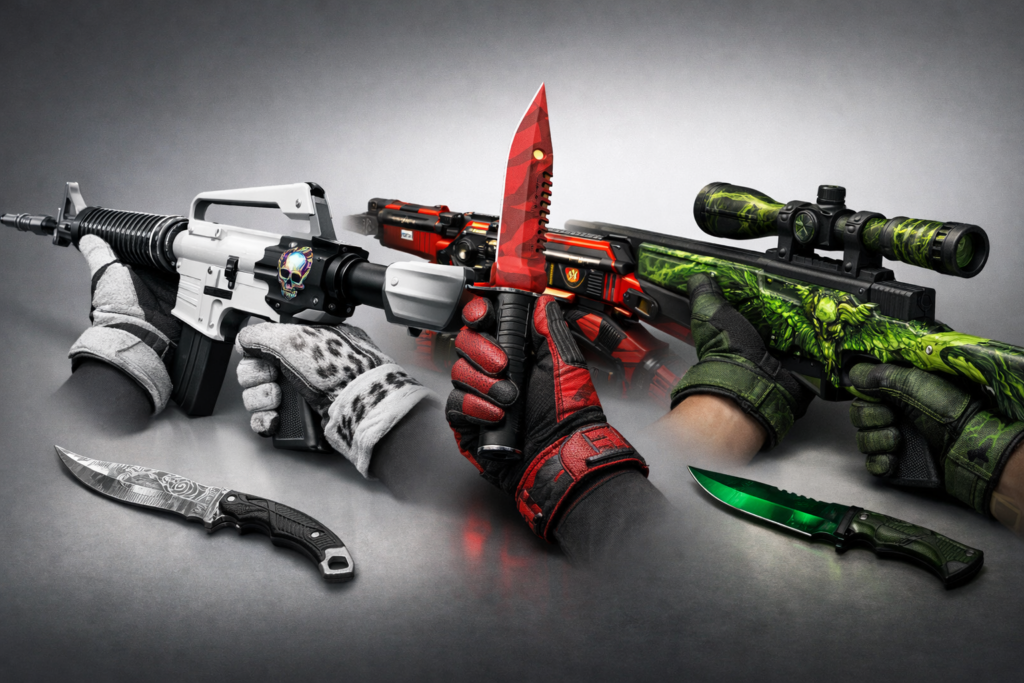
Let’s be honest with ourselves for a second. We don’t just play games for the mechanics anymore. If we did, we’d all be playing raw geometry wars with grey boxes. No, we play for the aesthetic. We play to flex. In the modern era of gaming, your digital inventory is essentially your second wardrobe, and frankly, some of you are dressing like you hit “randomize” in a character creator from 2004.
When we talk about Counter-Strike 2, we aren’t just talking about a tactical shooter. We are talking about one of the most sophisticated, user-driven digital economies in the tech world. It is a showcase of Source 2’s lighting engine, a lesson in virtual scarcity, and a masterclass in texture mapping. But nothing—and I mean nothing—exposes a lack of taste faster than a mismatched loadout. You spent all that crypto or hard-earned cash on a high-tier finish, only to pair it with gloves that clash so hard they practically cause screen tearing.
If you want to look like you understand the tech you’re wielding, you need synergy. You need to understand color theory, finish styles, and the visual weight of your assets. For example, slapping a pair of Snow leopard gloves onto a rustic, battle-scarred loadout isn’t “eclectic.” It’s a UI disaster. Let’s dive into the technology of aesthetics and how to actually curate a digital inventory that looks like pro-tier hardware.
The Source 2 Engine: Why Textures Matter More Now
Before we get into specific combos, we have to talk about the tech stack. When Valve ported the ecosystem over to Source 2, everything changed. We moved from static, somewhat flat lighting to physically based rendering (PBR). This matters because your cs2 skins don’t just sit there anymore; they react.
Metallic finishes reflect the environment. Pearlescent coatings shift hues based on the viewing angle relative to the in-game sun. This is a massive leap in graphical fidelity, and it means your pairings need to account for light. A matte finish glove paired with a highly reflective, metallic finish can create a jarring visual disconnect. It’s like wearing a tuxedo with Crocs.
The cs2 marketplace is flooded with options, but the savvy user looks at “wear” and “float” not just as a pricing metric, but as a texture feature. In the old days, “Factory New” was always better. In the new lighting engine, sometimes higher float values (the tech term for wear condition) reveal hidden artwork or change the patina of the item, making it look more like industrial hardware and less like a plastic toy.
The Monochromatic “Clean Tech” Build
Let’s start with the aesthetic that dominates the high-end tech space right now: Minimalism. Think Apple, think Teenage Engineering, think sleek, sterile laboratories. The goal here is removing visual noise. You want your loadout to look like it was designed in a clean room in Cupertino.
For this, you are looking at the Printstream family of assets. These items utilize a pearlescent finish that interacts beautifully with the lighting engine, shifting between stark white and iridescent pink/blue hues. To match this, you can’t just throw on red gloves. You need to stick to the monochrome palette.
This is where the cs2 skins market gets interesting. You want gloves that mimic high-end sportswear or driver gear. The King Snakes or the aforementioned Snow Leopards are the standard here. They are made in a white-gray color scheme, which allows the pearlescent shade of the gloves’ skin to stand out without attracting attention.
When browsing a cs2 skin marketplace, look for items that have “anodized” or “custom paint job” tags. These usually have solid color blocking. Avoid “patina” or “gunsmith” styles for this look, as they introduce rust and oil stains that ruin that clean, futuristic tech vibe.
The Cyberpunk RGB Aesthetic
We all know that one guy who builds a PC and puts so much RGB lighting in it that it doubles as a lighthouse. If that’s your vibe—if you want your inventory to look like a neon sign in a rain-slicked Tokyo street—you need to understand contrast and saturation.
In the best cs2 marketplace listings, you’ll see the Vice and Fade patterns commanding high prices. This is purely due to the color spectrum. The “Fade” technology is essentially a randomized gradient map applied to the 3D model. Getting a “Full Fade” (100% coverage of the gradient) is the holy grail of digital collecting.
To pair this, you need gloves that lean into the synth-wave palette. Vice Gloves (pink and blue) are the obvious choice, matching the Neon Rider or Fade skins perfectly. This isn’t about camouflage; it’s about signaling. It’s a “loud” loadout. It tells the lobby that you aren’t just here to play; you’re here to display assets.
However, a warning for the budget-conscious trying to navigate the cheapest cs2 marketplace options: cheap neon skins often look washed out. Source 2 exposes low-resolution textures ruthlessly. If you can’t afford the high-tier neon items, don’t try to force the look with low-quality knockoffs. It looks like a corrupted texture file.
Industrial Heavy Metal: The “Worn” Tech Look
Now, let’s pivot to the aesthetic that I personally think benefits the most from the new rendering tech: The Industrial/Rust look. In the real world of technology, we usually hate wear and tear. But in the marketplace cs2 ecosystem, “Battle-Scarred” is a mood.
This is for the players who treat their gear like tools, not trophies. We are talking about skins like the Rust Coat, the Wasteland Rebel, or the Chatterbox. These items use normal maps to simulate deep scratches, rust, and duct tape. They look tactile. You can almost feel the tetanus.
Pairing these requires a different approach. You don’t want sleek leather gloves. You want Hand Wraps or specialized gloves that look like they’ve seen some serious labor. The Leather Hand Wraps or the Duct Tape wraps are perfect here.
The beauty of this loadout is the economics. You can often find these items on the steam marketplace cs2 for a fraction of the price of the “clean” skins. Yet, when paired correctly, they look incredibly cohesive. It creates a narrative: you aren’t a collector keeping your toys in the box; you’re an operator in the field. It’s the “Cyber-Grunge” aesthetic.
The Digital Economy and The Search for “Blue Gems”
We cannot talk about cs2 skins without mentioning the Case Hardened phenomenon. This is perhaps the most unique aspect of Valve’s texture technology. The “Case Hardened” finish applies a texture sheet of simulated oil-hardened metal to the model. The position of the model on that sheet is randomized.
This results in “Blue Gems”—items where the model just happened to land on a section of the texture that is 100% blue. These are the unicorns of the cs2 steam marketplace. We are talking about database entries that trade for the price of a luxury car.
If you are lucky enough to own a Case Hardened item with a decent amount of blue, do not ruin it with red or green gloves. You need the Imperial Plaids or the Amphibious gloves. You need cool tones. The science of color temperature applies here. Warm gloves (crimson, orange) will make the blue steel look dull. Cool gloves (purple, teal) will enhance the reflection mapping of the blue steel.
Navigating the Marketplaces
So, where do you actually find these things without getting ripped off? The skin marketplace cs2 landscape is vast. You have the official Valve channel, which is safe but lacks the ability to “cash out” real money easily. Then you have third-party sites.
When looking for the best cs2 skin marketplace, you prioritize security and search filters. You need to be able to filter by “Pattern Template” (the seed that determines where the texture sits on the model) and “Float Value.” If a site doesn’t offer these specific technical filters, it’s useless for a serious collector.
You might stumble across Market CSGO skins and Market CSGO items during your search. Platforms like these often aggregate listings, allowing you to see the broad spectrum of what’s available. It’s all about data visibility. The more data you have on the item’s history and specific render seed, the better decision you can make.
Don’t just look for the cs2 marketplace steam integrates by default; sometimes the external APIs offer better visualization tools, allowing you to inspect the item in a 3D browser viewer before you buy. That is crucial tech. Never buy a high-tier skin based on a 2D thumbnail. That’s like buying a house based on a doodle on a napkin.
The Psychology of the Loadout
Why does this matter? Why write an entire article about matching virtual textures? Because in a digital-first world, your avatar is your primary interface with other humans.
In a lobby, nobody knows if you’re a CEO or a student. They only know you by your ping and your loadout. A coordinated inventory suggests competence. It suggests attention to detail. It implies that you understand the systems you are engaging with.
When you walk into the server with a Printstream rifle and matching Snow Leopard gloves, you are projecting a very specific “clean operator” vibe. When you rock a full red loadout with Crimson Kimonos and a Ruby Doppler, you are projecting aggression and high-value asset management.
Final Thoughts: It’s All Just Data
At the end of the day, these are just entries in a database. But so is the money in your bank account. The line between “real” and “virtual” value has been blurred for a long time. The cs2 skins market is just one of the most visible examples of this new reality.
So, if you’re going to participate in the digital economy, do it with some style. Don’t be the person with the mismatched, low-res textures looking like a rendering error. Learn the lighting engine. Learn the color wheel. Use the best cs2 marketplace tools available to you to snip the right floats.
Match your gloves to your tools. It won’t improve your aim—that’s a hardware and muscle memory issue—but it will definitely improve your user experience. And isn’t that what technology is supposed to be about?