


Remote support used to be simple: you’d connect, fix the issue, and move on. Today, it’s rarely that clean. Teams support coworkers, clients, and contractors across different time zones, different operating systems, and different levels of technical comfort. And when remote support tools create friction, slow session starts, confusing handoffs, scattered notes, small problems turn into long delays.
Modern remote support isn’t only about controlling a screen. It’s about reducing the little “wait moments” that stack up: waiting for someone to find the right link, repeating context to a new technician, hunting for device details, switching between chat and file sharing, or re-explaining the same steps for the third time.
This is where tools like HelpWire can make remote support feel more like a smooth workflow than a patchwork of apps.
Where remote support loses time (and why it matters)
Most delays aren’t caused by the technical fix itself. They happen around it. Common time drains include:
- Slow starts: the user can’t find what to download, or the join process is unclear
- Back-and-forth communication: instructions get missed, or the user doesn’t know what the technician is doing
- Tool switching: one app for remote control, another for chat, another for sending files
- No shared context: different teammates don’t see the same history, notes, or device information
- Unclear ownership: “Who’s handling this?” becomes a question during the session
Even if each issue adds only a few minutes, it compounds across a week of support tickets.
Faster sessions without making the user do extra work
Speed starts before the session begins. A modern approach focuses on getting a user connected quickly and keeping the session responsive once you’re in.
Helpful capabilities to highlight in your workflow include:
- On-demand session start (so you’re not spending time scheduling or chasing access)
- Performance optimization options (so support stays usable even on weaker connections)
- Multi-screen handling (so you can navigate setups that use two or more displays without constant toggling)
The goal is simple: less time getting connected, less time fighting the interface, more time solving the actual problem.
Clear communication that keeps sessions calm and efficient
Remote support gets dramatically easier when the user feels informed. If they know what’s happening, they’re less likely to interrupt, panic, or click something mid-fix.
That’s why communication features matter just as much as remote control. In a strong support flow, chat isn’t “extra” – it’s the running log of what you asked, what you tried, and what worked.
A practical communication setup should enable you to:
- Send short instructions while you work (e.g., “I’m going to restart the service now”)
- Confirm key steps (“Please verify the error is gone on your side”)
- Keep context visible so you don’t repeat the same questions later
For teams, it’s especially useful when communication stays consistent across handoffs, so a second technician can pick up the thread without restarting the conversation from zero.
File exchange that shortens the path to a fix
A lot of support work involves moving small but important files:
- logs and screenshots
- configuration files
- a diagnostic tool or installer
- exported reports
- documentation for the user
When file exchange is built into the support experience, you avoid the “email it to me” delay and the confusion of “Which version did you send?” It also helps you close tickets faster because you can collect proof of resolution (like logs before/after) while you’re already connected.
Organization features that quietly prevent repeat delays
Many teams focus on session features and forget the organizational side – until the ticket volume grows and everything starts feeling messy. A modern remote support tool should help you keep track of people, devices, and history without adding admin overhead.
Look for structure that supports:
Client and device context
- A client directory so you can find the right person quickly
- Workstation details so you’re not guessing which machine you’re on
- Grouping for users with multiple devices (common in small businesses and agencies)
Notes that stay with the client
- Private notes for recurring quirks and known fixes
- Session history or timelines so you can see what happened last time
- A simple way to capture outcomes: “Applied update X, rebooted, confirmed OK”
This reduces time spent re-discovering information you already learned once.
Team collaboration that doesn’t fall apart during handoffs
Even in small teams, support work is rarely handled by one person forever. People go offline, issues escalate, and someone else needs to step in.
That’s why modern remote support should support teamwork with:
- Teammate invites and roles (so the right people have the right level of access)
- Shared visibility into clients and sessions (so handoffs are smooth)
- A consistent way to manage contacts and access across the team
When collaboration is designed into the tool, you avoid the awkward “Forward me the details” scramble that slows everything down.
A simple support workflow you can copy into your team playbook
Here’s a practical flow that fits most small-business and distributed-team scenarios:
- Collect the basics: issue summary, urgency, and which device is affected
- Start the session quickly using an on-demand join method
- Explain what you’re doing in short messages as you troubleshoot
- Use multi-screen and performance controls to stay efficient
- Exchange files inside the session (logs, tools, confirmations)
- Capture the outcome in client notes so next time is faster
This kind of workflow is how “faster sessions” become real, because it’s not only about connection speed. It’s about eliminating the repeated friction around each support interaction.
HelpWire: A Modern Solution for Remote Support
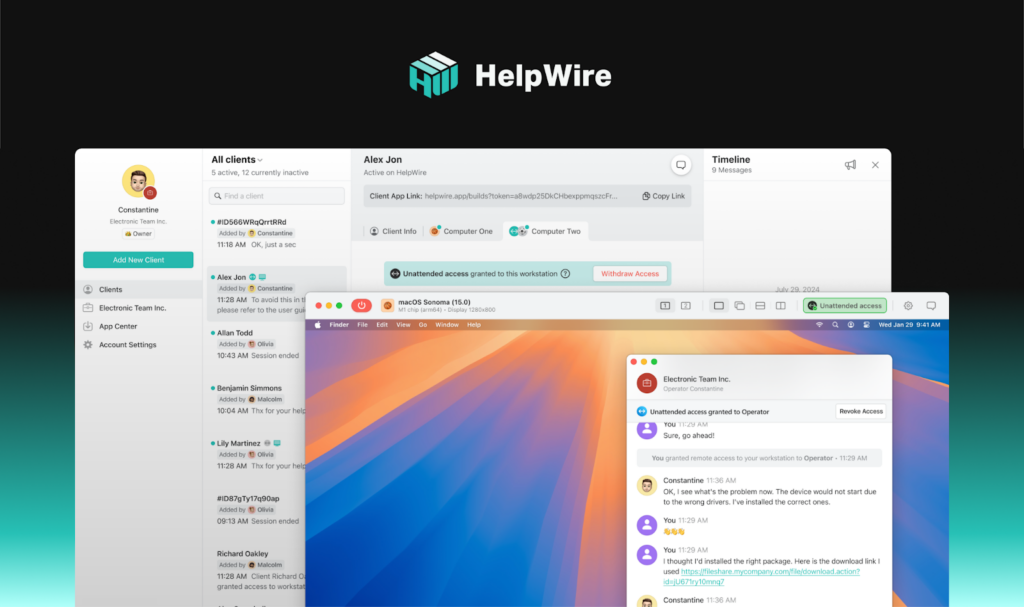
HelpWire stands out as a comprehensive remote support solution designed to streamline support workflows while ensuring both speed and security. Whether you’re troubleshooting for clients, assisting remote team members, or managing multiple devices, HelpWire offers a suite of features tailored to enhance the support experience from both sides of the connection.
Key Features of HelpWire for Remote Support:
- On-Demand Session Start
HelpWire allows you to instantly connect with clients or teammates through quick-start links. This removes the wait time typically spent on setup, letting you dive straight into solving the issue, which is essential for keeping support workflows fast and efficient. - Multi-Device and Multi-OS Support
Whether you’re working with Windows, macOS, or Linux, HelpWire enables seamless cross-platform support. This flexibility is particularly valuable when managing a variety of devices within a team or across different clients. - Real-Time File Exchange
Instead of wasting time switching between email, messaging apps, and remote tools, HelpWire integrates file sharing directly into the remote session. This enables users to quickly send logs, installers, screenshots, or other necessary files to resolve issues without delays. - Clear Communication with In-Session Chat
Communication is just as crucial as the technical fixes in remote support. HelpWire’s built-in chat feature keeps all conversations organized within the session itself, reducing the need for back-and-forth outside of the remote connection. Technicians can explain what actions they’re taking in real time, enhancing clarity and reducing misunderstandings. - Session History & Client Profiles
HelpWire stores session history, client profiles, and device details, which allows you to easily reference previous interactions and device-specific quirks. This is invaluable for teams working with repeat clients or troubleshooting similar issues over time. By having all the necessary context available at a glance, HelpWire helps reduce repetitive troubleshooting and accelerates resolution times. - Security and Trust
With built-in encryption and controlled access options, HelpWire ensures that every remote session is secure and meets the highest standards for privacy. Features like consent-based remote control and the ability to end sessions quickly provide peace of mind for both technicians and users.
Final takeaway
Remote support works when it feels simple for the user and structured for the technician. The modern standard is a toolset that helps you connect quickly, communicate clearly, and keep enough context so you don’t waste time repeating work.
If your team supports multiple people, multiple devices, or multiple operating systems, building your workflow around those three outcomes – speed, clarity, and fewer delays – can make remote support feel like a steady process instead of a daily fire drill.